Make your own desktop pet
Clicky Pet is a desktop pet app and the tools to make pets for it. Build one from your own art, start from a single picture, or begin with a pet that comes with the app. Free for Windows and Mac, under 10 MB.
Free for Windows and Mac



From your own art
Bring the parts you drew, or a BUG Clicker PSD. Set its lines, petting icon and sound, and see it react as you go. Free, and your files never leave your browser.
Open the pet maker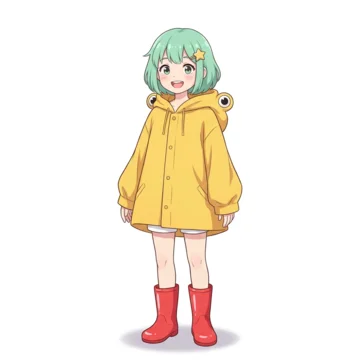

From one picture
Have a character but no parts? Drop in one picture and we draw the parts for you; fine-tune it after. $4.99 a pet.


Ready-made pets
Clicky, Mint and Mochi come with the app. Click them, pet them, keep several out at once.
Get the app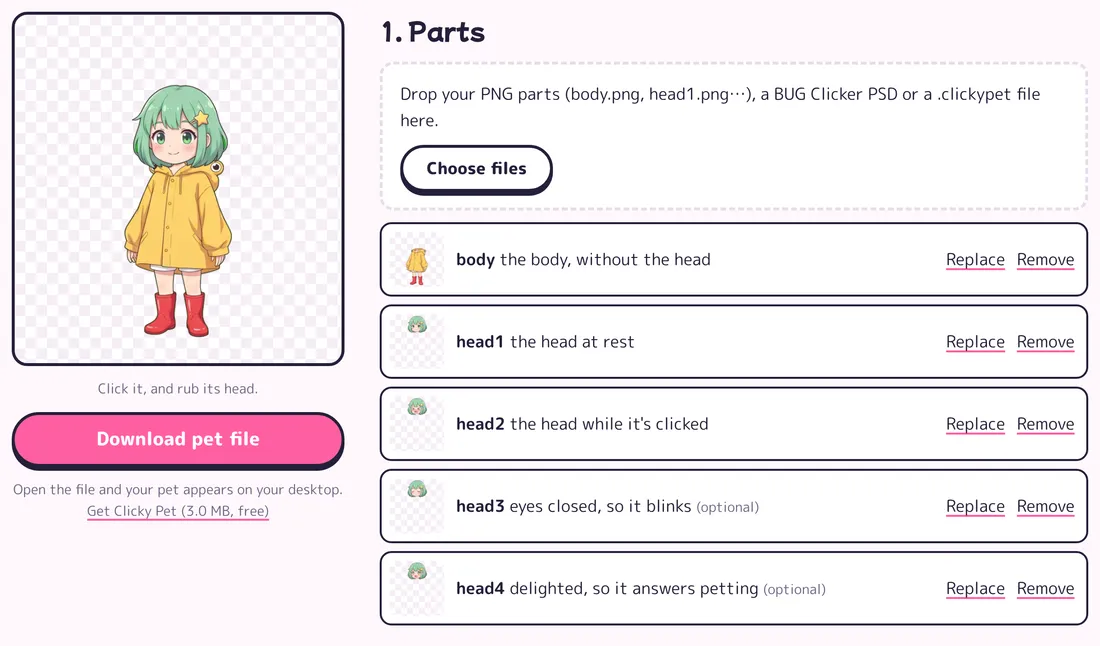
Build a desktop pet from your own art
The pet maker is made for people who draw. Your art goes in exactly as you made it: nothing is generated, nothing is uploaded, nothing is used to train AI.
- Five parts, the same as BUG Clicker's: the body, and the head at rest, when clicked, with its eyes closed and delighted.
- Drop in PNGs named body, head1 and so on, or a BUG Clicker PSD: each part finds its slot.
- Up to 20 lines it says when clicked, a petting icon and a click sound, or your own picture and clip.
- A live preview: click it and rub its head while you build.
- One .clickypet file: open it and your pet is on your desktop, or send it to a friend.
Turn one picture into a desktop pet
For when you have a character but no parts. Drop in one picture of your OC or drawing: an AI image model draws its parts, and its lines, icon and sound are picked to suit it.
Pay $4.99 once and it's ready in 1 to 4 minutes, so get the app while you wait. It blinks, answers petting and comes with its BUG Clicker PSD. Change anything afterwards in the pet maker.
Use a character you have the right to use. Your picture is deleted a day after the pet is made and is never used to train AI.
Paid once with Stripe: card, Apple Pay or Google Pay. Then your pet is made: it blinks, answers petting and goes on your desktop.
Or start with our desktop pets
Clicky, Mint and Mochi come with Clicky Pet: 3.0 MB for Windows, 6.7 MB for Mac. Try them here: click one, or rub its head.
What your desktop pet does
- Click it: its head squishes, it makes its sound and says one of its lines.
- Leave it be: it breathes, and with an eyes-closed face it blinks now and then.
- Rub its head: it sways, makes a delighted face and sends up its icon, hearts or notes or stars.
- Drag it anywhere. It stays on top of your windows and is back in the same spot next time.
- Have several out at once: right-click one to change it, add another or put it away. Clicky, Mint and Mochi come with the app.
That's all it does, on purpose: no settings to learn, no account, nothing running in the background but your pets.
A desktop pet that stays out of your way
Clicky Pet is made to sit quietly on your desktop until you want it:
- Clicks go through to your windows everywhere except on the pet itself, so it never gets in the way of your work.
- Hide all your pets from the menu with one click, and bring them back the same way.
- Each pet remembers where you left it and is back there the next time you open the app.
- On a Mac it lives in the menu bar, not the Dock; on Windows, in the notification area.
- No account inside the app and no settings to learn: open it and your desktop pets are there.
- It works offline: once Clicky Pet is on your computer, your desktop pets don't need the internet, and nothing about them is sent anywhere.
Already use BUG Clicker? Make your character's BUG Clicker PSD from one picture, no drawing needed. See how BUG Clicker and Clicky Pet compare.
Open the PSD makerQuestions
Is Clicky Pet part of BUG Clicker?
No. BUG Clicker is a free desktop pet app made by BUG (@BUGnDEV). Clicky Pet is an independent app by Lunonia Inc., not affiliated with BUG Clicker. A pet you make from a picture here comes with its BUG Clicker PSD too, and the import guide shows how to load it.
Is Clicky Pet free?
The app is free, and so is the pet maker for your own drawings. A pet made from your picture is $4.99, paid once: it blinks, answers petting and comes with its BUG Clicker PSD. See pricing.
Does Clicky Pet use AI?
Only if you start from a picture: then an AI image model draws the parts and an AI model writes its lines. The pet maker uses your own art exactly as you made it, in your browser. Nothing you give us is used to train AI.
Is it safe to open?
It isn't code-signed yet, so Windows and macOS ask once before opening it; the download page shows what to click. The app keeps your pets on your computer and sends nothing anywhere.
Can I have more than one desktop pet out?
Yes. Right-click a pet and choose Add another pet, or use Clicky Pet's menu in the notification area or the menu bar. Each one can be a different pet: right-click it and pick one under Change pet. They all stay on top of your windows and remember where you left them.
How big is the app, and where does it go?
It's a 3.0 MB download for Windows and 6.7 MB for Mac. On Windows there's nothing to install: it runs from the folder you unzip it to. On a Mac it goes in Applications and lives in the menu bar, not the Dock. Your pets, and where each one sits, are kept on your computer.
Can I share my desktop pet with a friend?
Yes. Every pet is one .clickypet file, whether you built it in the pet maker or started from a picture. Send the file, and your friend opens it in Clicky Pet, which is free for them too. Share only characters you have the right to use.
Does it work on a phone?
Not yet: Clicky Pet is for Windows and Mac. You can still start a pet from a picture on your phone and send it to your computer from the result.
What happens to what I send with Questions & ideas?
We read it to answer you and decide what to build. The email is only for writing back; nothing is sent to it otherwise. See the Privacy Policy.